
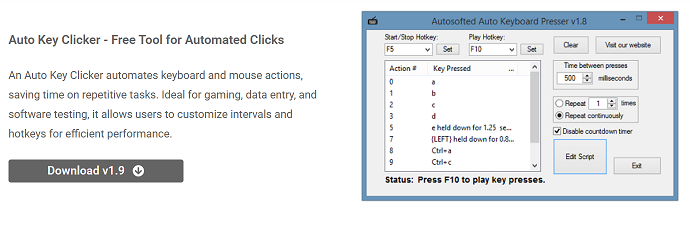
Gaming often involves repetitive tasks that require constant clicking and key pressing, which can lead to fatigue and a decline in performance. Players seeking to enhance their gaming experience look for ways to automate these monotonous tasks. AutoKeyClicker is a free tool designed to automate mouse clicks and keystrokes, making it a popular choice among gamers.
This tool can relieve players from physically exhausting tasks, allowing them to focus on strategy and gameplay. With customization options for click speed and key presses, AutoKeyClicker adapts to different game requirements. Understanding how it supports gaming automation is crucial for anyone seeking to enhance efficiency.
AutoKeyClicker Automates Gaming Actions
Simulating Rapid Mouse Clicks
AutoKeyClicker can simulate rapid mouse clicks, which are useful in games requiring fast firing, resource gathering, or repetitive selection. This automation replicates human clicking but at much higher speeds and with consistent accuracy. It helps maintain performance without physical strain.
Automating Keyboard Inputs
Many games require frequent keyboard actions, such as movement or skill activation. AutoKeyClicker supports automated keystrokes, enabling users to simulate repeated key presses. This reduces the effort needed for complex or timed inputs, enhancing gameplay efficiency.
Customizing Automation Parameters
Players can adjust the speed, duration, and type of clicks or keystrokes to match their gaming needs. Whether slow and precise or rapid and continuous, customization ensures that automation fits the game’s mechanics. This flexibility makes it suitable for a wide range of titles.
Benefits of Using AutoKeyClicker in Gaming
Reducing Physical Fatigue
Continuous clicking or key pressing can cause hand fatigue and repetitive strain injuries. AutoKeyClicker eliminates the need for constant manual input, enabling players to avoid discomfort during extended gaming sessions. This leads to healthier and more enjoyable gameplay.
Improving Gameplay Consistency
Human clicking speed and accuracy can vary due to fatigue or distraction. Automated clicks and keystrokes maintain consistent timing and precision, which is especially beneficial in competitive or timing-sensitive games. Consistency improves overall performance.
Enabling Longer Gaming Sessions
By automating tedious tasks, players can extend their gaming sessions without becoming exhausted. This helps in games that require prolonged grinding or farming. AutoKeyClicker supports sustained play without sacrificing physical well-being.
- Minimizes hand fatigue
- Ensures consistent inputs
- Supports long-duration play
Popular Gaming Scenarios for AutoKeyClicker
Resource Farming
Many games require repetitive clicking to gather resources or perform crafting. AutoKeyClicker automates these clicks, saving time and effort. Players can focus on strategy or exploration while automation handles the grind.
Skill Activation and Combos
Some games require pressing key combinations rapidly to activate skills. AutoKeyClicker’s keyboard automation can execute these combos flawlessly, improving reaction times and gameplay efficiency.
Auto-Clicking in Idle Games
Idle and clicker games depend heavily on continuous clicking to progress. AutoKeyClicker performs these repetitive actions automatically, helping players advance faster without constant manual input.
Set Up AutoKeyClicker for Gaming
Selecting Appropriate Click Speed
Choosing the right click interval is crucial; too fast may trigger anti-cheat systems, while too slow reduces effectiveness. Players should experiment with speeds that balance performance and safety in their specific game environment.
Configuring Click Types
Most games use left-clicks, but some require right-click or double-click actions. AutoKeyClicker allows switching click types easily, ensuring compatibility with various game mechanics and actions.
Assigning Hotkeys for Control
Setting start, pause, and stop hotkeys allows players to manage automation during gameplay seamlessly. This flexibility helps avoid unwanted clicks and maintains control over automated actions.
- Adjust click intervals carefully
- Choose the correct click types
- Use hotkeys for easy control
Risks and Precautions in Gaming Automation
Avoiding Detection by Anti-Cheat Systems
Many online games have strict policies against automation and use software to detect it. Using AutoKeyClicker improperly can result in bans or penalties. Players should research game rules and use automation responsibly.
Preventing Gameplay Disruption
Incorrect settings may cause misclicks or unintended actions, disrupting gameplay. Thorough testing and careful configuration help avoid errors and ensure smooth automation.
Respecting Fair Play
While automation can improve efficiency, overreliance may reduce the skill and challenge in gaming. Players should use AutoKeyClicker ethically to maintain a fair and enjoyable environment for all.
Tips to Maximize Gaming Automation
Start with Low Speeds
Begin automation at slower click rates and increase gradually to avoid detection and errors. This cautious approach helps find the optimal speed for your game.
Combine Mouse and Keyboard Automation
Using both click and keystroke automation together can enhance gameplay, especially in games requiring complex input sequences. This combination streamlines control.
Regularly Update AutoKeyClicker
Keeping the software up to date ensures compatibility with new games and security improvements. Updates often improve performance and add useful features.
Alternatives and Complementary Tools
Gaming-Specific Macro Software
Some macro tools offer advanced scripting, delays, and conditional commands tailored for gaming. Combining AutoKeyClicker with such software can enhance automation capabilities.
Hardware Solutions
Programmable gaming mice and keyboards can automate clicks and key presses at the hardware level. These devices provide additional precision and customization beyond software tools.
Game Mods and Bots
In some games, mods or bots offer dedicated automation but may risk violating the terms of service. Users should weigh benefits against potential penalties when considering these options.
- Use gaming macros for complex tasks
- Enhance automation with hardware
- Consider risks with game bots
Conclusion
AutoKeyClicker can significantly aid gaming automation by simulating rapid mouse clicks and keystrokes, reducing physical strain and improving gameplay consistency. Its customization options allow players to tailor automation to their specific game requirements. While beneficial, users must be cautious to avoid detection and respect fair play principles. When used responsibly, AutoKeyClicker is a valuable tool for gamers seeking to automate repetitive tasks and enhance their overall experience.