Your Channel Deserves a Banner That Actually Works for You
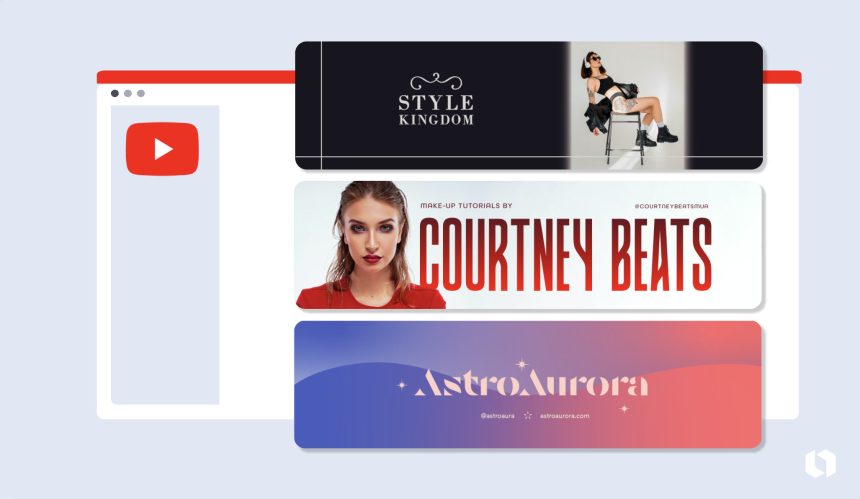
Your YouTube channel art is the first thing a new viewer sees when they land on your page, and first impressions move fast. A blurry, off-size, or generic banner can quietly signal to potential subscribers that your content might not be worth their time. On the flip side, a clean, well-designed banner communicates professionalism, builds brand recognition, and sets the tone for everything you publish. The good news is that you do not need to be a professional graphic designer or spend hundreds of dollars to get a banner that looks like you hired one. A growing number of online services offer professionally designed templates specifically built for YouTube banners, making the entire process faster, more accessible, and far less frustrating than starting from scratch.
Why Your YouTube Banner Matters More Than You Think
A YouTube banner, also called channel art, spans the top of your channel page and displays differently depending on the device. On a desktop, viewers see a wide horizontal strip. On mobile, only the center section is visible. On a connected TV, the entire image fills the screen. This means a poorly planned banner can look cropped or awkward depending on how someone finds you.
Beyond the technical specs, your banner is a branding opportunity. It tells viewers who you are, what your channel is about, and when you post. Channels that invest in cohesive visual branding, including a consistent banner, profile picture, and thumbnail style, tend to build subscriber loyalty faster because they look and feel like a real brand, not just a hobby project.
The demand for polished channel art has grown alongside the creator economy, and template-based design services have responded accordingly. Today’s best platforms offer YouTube-specific templates built to the correct dimensions, with safe zones already marked, so you can design with confidence and not guess whether your logo will get cut off.
What to Look for in a Template-Based Design Service
Not all design platforms are created equal. Before you commit to one, it helps to know what separates a genuinely useful tool from a frustrating experience.
Template Quality and Variety
The best services offer templates that go beyond clip art and basic shapes. Look for platforms with templates designed by actual graphic designers, featuring thoughtful typography, layered elements, and visual hierarchy. A library of 10 templates is not enough. You want options across niches, from gaming and tech to beauty, fitness, cooking, and education, so you can find a starting point that actually fits your content style.
Customization Depth
A template is only a starting point. The platform should let you replace placeholder text with your own channel name and schedule, swap out colors to match your brand palette, upload your own logo or photo, and rearrange elements without things falling apart. If you cannot meaningfully make the template your own, it is not a useful tool.
Export and Sizing Options
YouTube recommends uploading channel art at 2560 x 1440 pixels, with a safe zone for text and logos between 1546 x 423 pixels. A good design service will either auto-size your design to these specs or provide a template pre-set to the correct dimensions. Exporting in PNG or JPG at high resolution is a must.
Ease of Use
Design tools exist on a spectrum from beginner-friendly drag-and-drop editors to professional-grade software that requires real skill to use. For most creators, a browser-based editor with intuitive controls is the right fit. You want to spend your time creating content, not learning software.
Pricing and Access
Many services offer free tiers with access to a subset of templates, while premium subscriptions unlock the full library, additional features, and commercial licensing. Consider what you actually need before paying for features you will not use.
Top Tips for Using Template Services to Create a Standout YouTube Banner
1. Start With a Template That Matches Your Niche Energy
Browse template libraries with your content category in mind. A gaming channel and a mindfulness channel have very different visual languages, and the right template immediately speaks to your audience. Choosing a template that clashes with your niche forces you to do more work to make it fit, and the result often looks patched together rather than cohesive.
2. Use Adobe Express for a Polished, Professional Result
One of the most well-rounded options available is Adobe Express, which offers a dedicated collection of professionally designed templates for your YouTube banner. The templates are built to the correct YouTube dimensions and are fully customizable within the browser-based editor. You can change fonts, colors, layouts, and images without needing any design experience, and Adobe’s asset library gives you access to stock photos, icons, and graphics to personalize your design further. The platform also maintains the quality and visual consistency you would expect from a company with decades of design software expertise, which shows in the template quality. For creators who want a banner that looks like it was made by a professional without the professional price tag, Adobe Express is a strong starting point.
3. Lock In Your Brand Colors Before You Start Designing
One of the most common mistakes creators make is choosing template colors based on what looks good in the editor rather than what aligns with their existing brand. If your thumbnails use a specific shade of orange and black, your banner should echo those choices. Most design tools let you enter exact hex color codes, so write down your brand colors before you open the editor and apply them consistently.
4. Keep the Center Safe Zone as Your Primary Design Area
Because your banner displays differently across devices, the only area guaranteed to be visible everywhere is the center section. Keep your channel name, tagline, and upload schedule within this safe zone. Many template services include a visual overlay or guide to show you exactly where this zone is. If yours does not, you can download a YouTube channel art template guide separately and reference it while designing.
5. Use High-Resolution Images and Graphics
Blurry banners are an immediate credibility killer. When uploading your own images or logos, always use the highest resolution version available. PNG files with transparent backgrounds are ideal for logos. If you are using a photo of yourself, make sure it is sharp, well-lit, and at least 1000 pixels wide before uploading it into your design.
6. Limit Yourself to Two or Three Fonts
Template services often offer access to dozens of fonts, and it can be tempting to use several in a single design. Resist that urge. A clean banner typically uses one font for the channel name and one for supporting text like a tagline or posting schedule. Mixing too many fonts creates visual chaos and makes your banner harder to read at a glance.
7. Include Your Posting Schedule in the Banner
Viewers who are deciding whether to subscribe want to know what they are signing up for. Adding a short posting schedule to your banner, such as “New videos every Tuesday and Friday,” gives potential subscribers useful information and signals that you are consistent and reliable. Most YouTube banner templates include a placeholder for this information. Fill it in.
8. Test Your Design on Multiple Devices Before Publishing
Before you upload your finished banner, view it on at least a desktop browser, a smartphone, and if possible, a smart TV or gaming console. What looks balanced on a laptop screen might appear cramped or off-center on a phone. Many design platforms include a preview feature that simulates how your banner will appear across different devices. Use it.
9. Update Your Banner to Reflect Seasonal or Content Changes
Your banner does not have to be permanent. Many successful creators update their banners periodically to reflect new series, milestones, or seasonal themes. Because you are working from a saved template, updates take minutes rather than hours. This keeps your channel looking active and intentional without requiring you to redesign from scratch every time.
10. Match Your Banner to Your Thumbnail Style
Your banner and thumbnails should feel like they belong to the same visual world. If your thumbnails feature bold, high-contrast text with a specific color scheme, your banner should echo that aesthetic. Consistent visual branding across your channel page creates a professional, intentional impression and helps viewers instantly recognize your content in their feed.
How Template Services Compare to Hiring a Freelance Designer
Hiring a freelance graphic designer for YouTube channel art typically costs anywhere from $50 to $300 or more depending on the designer’s experience and what is included in the package. That investment can absolutely be worth it for creators who have an established brand identity and need custom artwork. But for newer creators, those on a budget, or anyone who expects to update their banner regularly, template-based services offer a compelling alternative.
The key advantage of templates is speed. You can go from no banner to a finished, upload-ready design in under an hour. You also retain full control and can make changes anytime without waiting on a designer’s availability or paying revision fees. The tradeoff is that templates, no matter how good the starting point, require some creative judgment to personalize effectively. The more effort you put into customizing colors, fonts, images, and layout, the less your final design will look like a template and the more it will look like it was made just for you.
FAQ
What size should a YouTube banner be, and do template services account for this?
YouTube recommends uploading channel art at 2560 x 1440 pixels with a maximum file size of 6 MB. The most critical area, the region visible across all devices including desktop, mobile, and TV, falls within a central safe zone of roughly 1546 x 423 pixels. Reputable template services pre-size their YouTube banner templates to these exact dimensions and often include visual guides to help you keep your important content within the safe zone. If you are using a platform that does not have a YouTube-specific template, you will need to create a custom canvas at 2560 x 1440 and manually ensure your key design elements stay within the center portion. Always double-check the final export size before uploading, since resizing a design after the fact can reduce image quality.
Can I use a free template service for a professional-looking YouTube banner?
Yes, many template services offer free tiers that include access to a solid selection of professionally designed templates, and the results can absolutely look polished and professional. The difference between free and paid tiers usually comes down to the size of the template library, access to premium fonts and stock images, the ability to remove watermarks, and whether commercial use is permitted. For creators just starting out, a free plan is often more than enough to create a high-quality banner. As your channel grows and your brand identity becomes more defined, upgrading to a paid plan gives you more creative flexibility. The most important factor is not the tier you are on but how thoughtfully you customize the template you choose.
How often should I update my YouTube banner?
There is no hard rule, but updating your banner two to four times per year is a good general rhythm for active creators. Common triggers for a banner update include launching a new content series, reaching a subscriber milestone, rebranding your channel, or marking a seasonal moment relevant to your niche. Updating too frequently can confuse regular viewers who have come to recognize your visual identity, while never updating at all can make a channel look stagnant. If you are using a template service, saving your base design makes it easy to swap out one or two elements for a refresh without redoing everything from scratch. The goal is to keep your channel looking current and intentional without sacrificing the visual consistency that builds brand recognition over time.
What elements should every YouTube banner include?
At minimum, your YouTube banner should include your channel name, a visual element that reflects your content niche (whether that is a photo of yourself, an illustration, or a themed graphic), and your posting schedule. Many creators also include social media handles or a short tagline that communicates their channel’s value proposition. What your banner should not include is too much text, overly complex backgrounds that compete with your channel name, or images that are only clear at full resolution and become indistinct when scaled down for mobile. Simplicity and clarity are your best tools. A viewer should be able to glance at your banner and understand what your channel is about within two or three seconds. If you want to test whether your banner communicates clearly, try showing it to someone unfamiliar with your channel and asking them to describe what they think the channel is about based only on the art.
Are there tools that can help me plan my YouTube channel strategy beyond just the banner design?
Absolutely. Visual branding is only one piece of building a successful YouTube channel. For creators looking to grow their audience strategically, tools that help with keyword research, video SEO, and performance analytics are just as important as having a great-looking channel page. TubeBuddy is a browser extension and platform specifically built for YouTube creators that helps with keyword research, tag optimization, A/B thumbnail testing, competitor analysis, and channel audits. It integrates directly with YouTube and provides data-driven recommendations to help your videos surface in search results and recommendations. Pairing a polished, professional banner created with a template service with a strong content and SEO strategy gives your channel the best foundation for sustainable growth.
Conclusion
Your YouTube banner is one of the most visible pieces of real estate on your entire channel, and it deserves more than a rushed five-minute design job. The good news is that creating something genuinely professional no longer requires a design degree or a large budget. Template-based design services have made it possible for creators at every level to produce channel art that looks intentional, branded, and visually compelling. Whether you are launching a new channel or refreshing an existing one, the tips and tools outlined in this article give you a clear path forward.
The key is to approach your banner as a strategic asset rather than a box to check. Choose a template that matches your niche, customize it to reflect your actual brand, keep your most important information in the safe zone, and test across devices before going live. With the right service and a little creative effort, your banner can do real work for your channel every single day, turning casual page visitors into engaged, loyal subscribers.